Summary
The goal of our web app was to make podcasting ridiculously simple. For anyone.
Problem:
Scheduling calls, hosting guests and editing video calls was error-prone and stressful. Existing software did the job but often got in the way.
Solution:
Call recorder that any podcaster can use to reliably record episodes with anyone around the world connected to the web.
Impact:
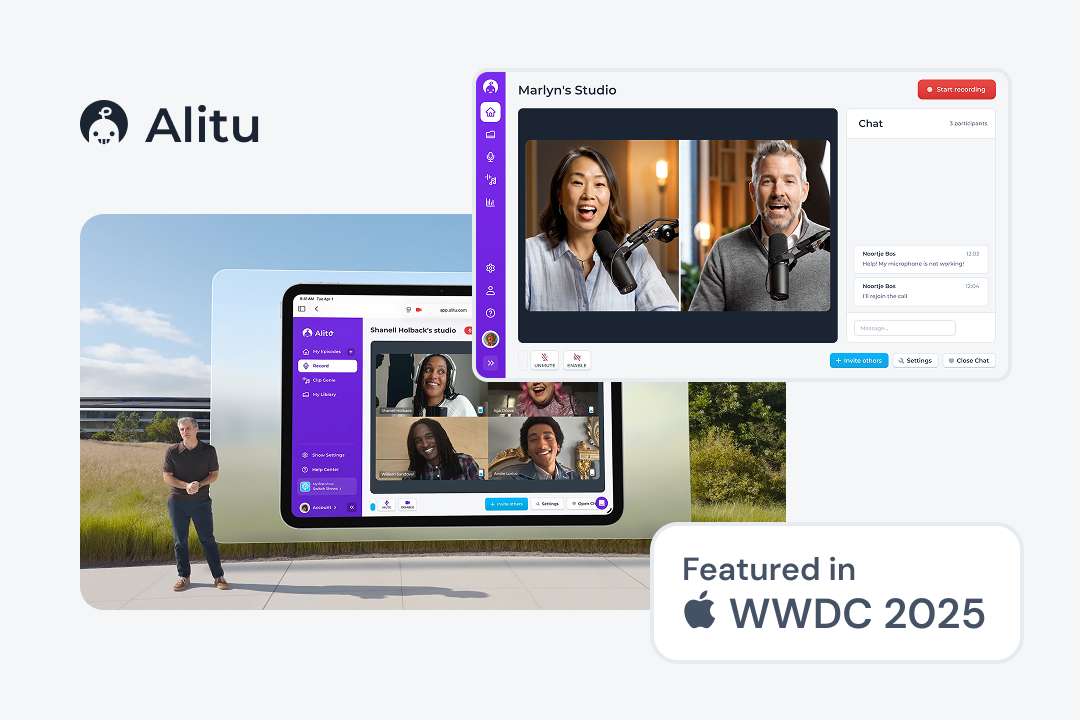
The interface I designed was featured in Apple’s WWDC 2025 as an example of recording calls on the web and its simplicity was much-loved by users surveyed.
Context
This project started because our ongoing user research identified problems new podcasters faced when trying to record with others using traditional call recording software like Zoom or Google Meets. An opportunity appeared to reimagine video calling for podcasters.
| # | Problems with standard video calling software | Why it mattered | My design challenge |
|---|---|---|---|
| 1 | The learning curve for enterprise video calling software is steep and set-up plus onboarding is time-consuming. | Learning the interface and feeling comfortable in it can take a lot of time especially for less tech-savvy older users. Hosts need to feel confident with the app before inviting a high-profile guest. | Improve learnability of the interface using familiar mental models and affordances. |
| 2 | Recording with an esteemed guest is a high-stakes, low-attention process. | Complex interfaces, while highly functional, are error-prone when user attention is exhausted | Create an interface with features that are essential for podcasting and nothing more. |
| 3 | Some users find it hard to keep track of meeting links, especially if they are not relying on an online calendar. Likewise, guests sometimes visit outdated URLs and think the host has forgotten about them. | For guests, especially high-stakes ones, time is valuable and their availability is low so less friction before the call makes for a less stressful recording for everyone. | Make it easy for hosts and guest to join the call without relying on memory or extra tools |
| 4 | Some guests forget to mute their microphone when not speaking | Cross-talk and disruptive background noise is hard to fix after the recording and can lead to unprofessional sounding episode. | Give hosts controls to prevent background noise and cross-talk without offending guests. |
| 5 | Podcasters recording remotely often have to deal with poor internet and there is usually no good way to fix that. | Interviews are the core of any episode. Poor quality audio or video can ruin an otherwise good episode and cause the host to feel anxious throughout, not giving a 100% to the conversation | Explain the double ender system to hosts without getting too technical and ensure everyone stays in the call long enough for local recordings to sync up. |
Conceptual design
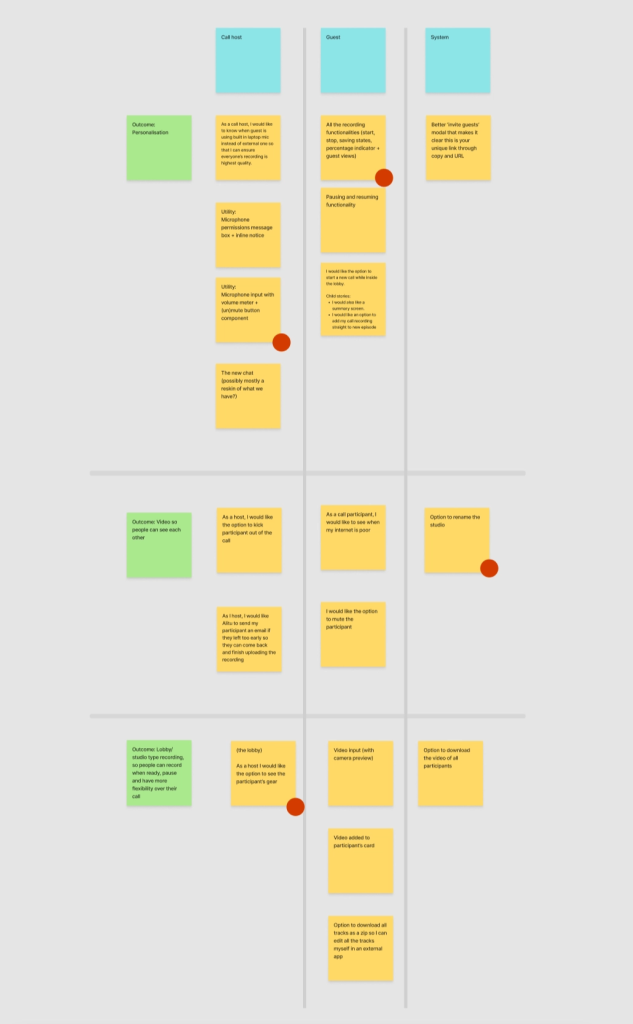
Using a technique called user story mapping, I helped the team organise the insights from the research into feasible releases by conducting a workshop, facilitated by a digital whiteboard. This helped us scope the work and focus on the most important features first:
Mental model of a physical studio to aid learnability
The interface work began with considering the first problem. I conducted a UX review of direct and indirect competitors and mapped out the steps hosts had to take with software like Zoom as a user journey. This helped me identify points of friction and, crucially, gave me an idea for reducing the complexity.
Many of the platforms available today make the user memorise a lot of terminology and rely on mental models that are unnecessarily complex, i.e. ‘new session’, ‘schedule call’, ‘new meeting’, ‘start event’, ‘open room.’ Users have to navigate many pages and modal windows to get around the app which I found quickly drains short-term memory.
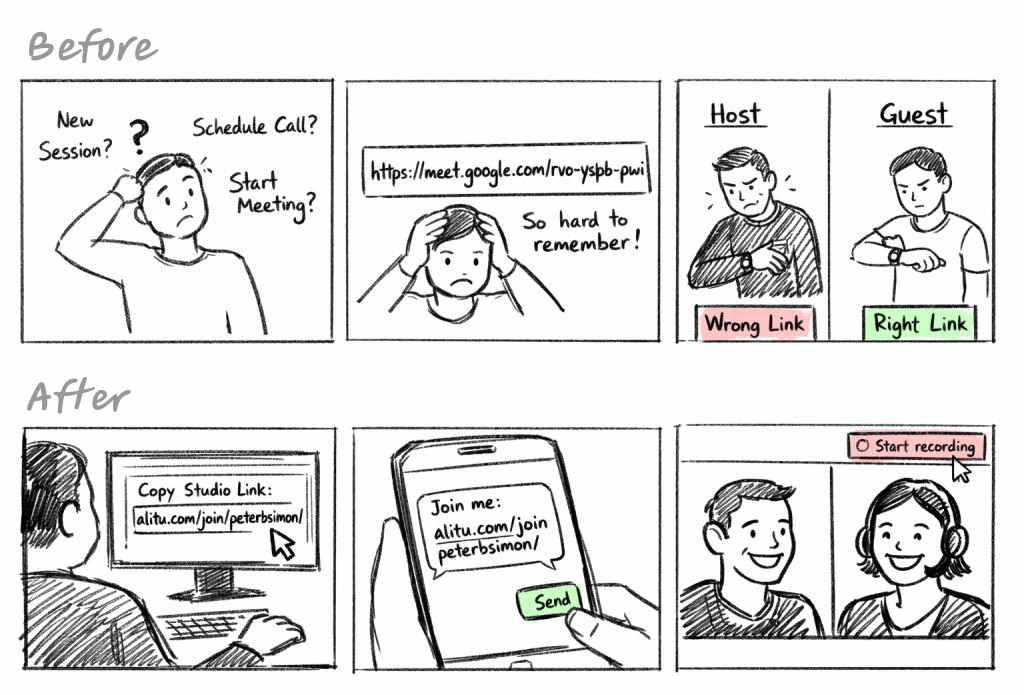
Something told me this could be simpler so I let my thoughts leave the digital world and realised that everyone subconsciously knows how to record a conversation with someone: get into a studio > hit ‘record’ > talk > press ‘stop’ > say goodbyes > leave. I decided this would be the mental model I’d use to improve learnability. We’d create a virtual Studio for every host with a unique address that could be given out to guests. Guests visit the address, talk, and then leave. Simple as that. No calendar invites, 18 character long hex codes or fancy enterprise terminology.
Detailed design (constraints and essential controls)
True simplicity is derived from so much more than just the absence of clutter and ornamentation. It’s about bringing order to complexity. That’s not my line, it’s Jony Ive’s, but I do try to apply this principle to every design project. Drawing on the insights and user story map above, I started with a breadboard — a low-fidelity user flow. This helped me think through the elements necessary to make the interaction work and the discrete screens I’d need. The goal was to keep just the essentials and add helpful constraints to make the interface less error-prone.
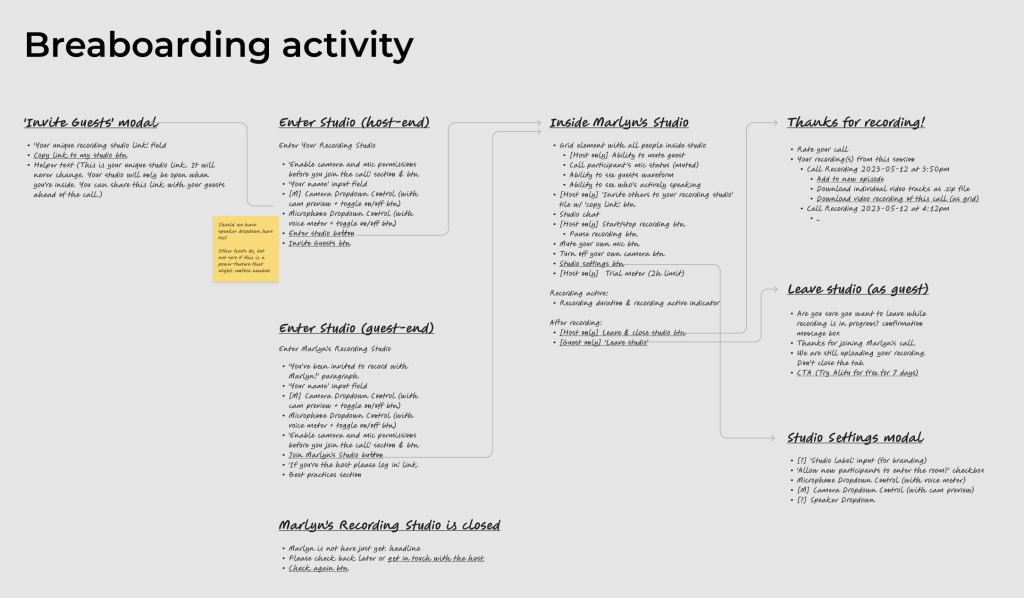
This artefact helped me talk through the design with engineers and ensure feasibility throughout. After addressing their concerns, I sketched out a low-fidelity version of the interface.
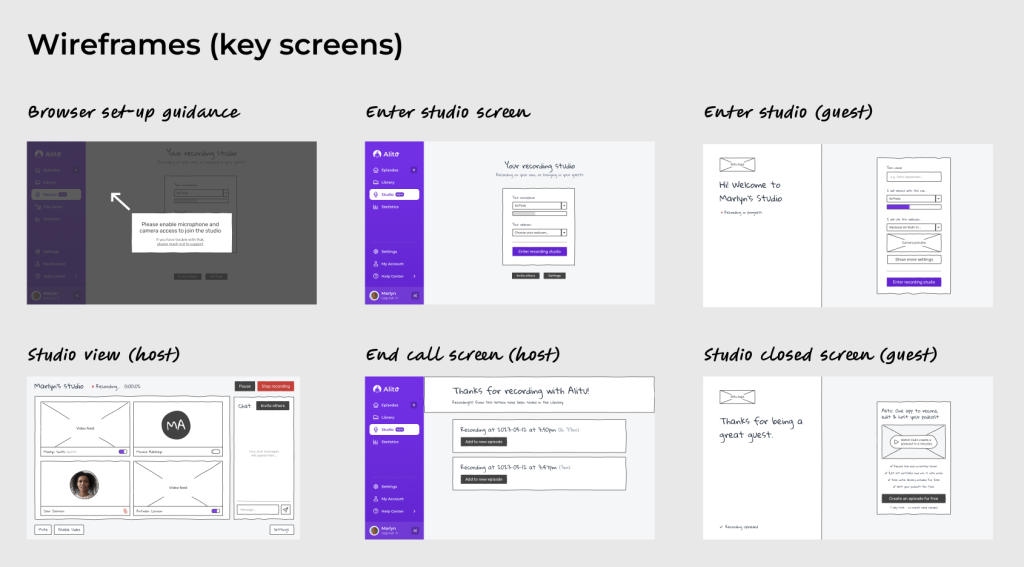
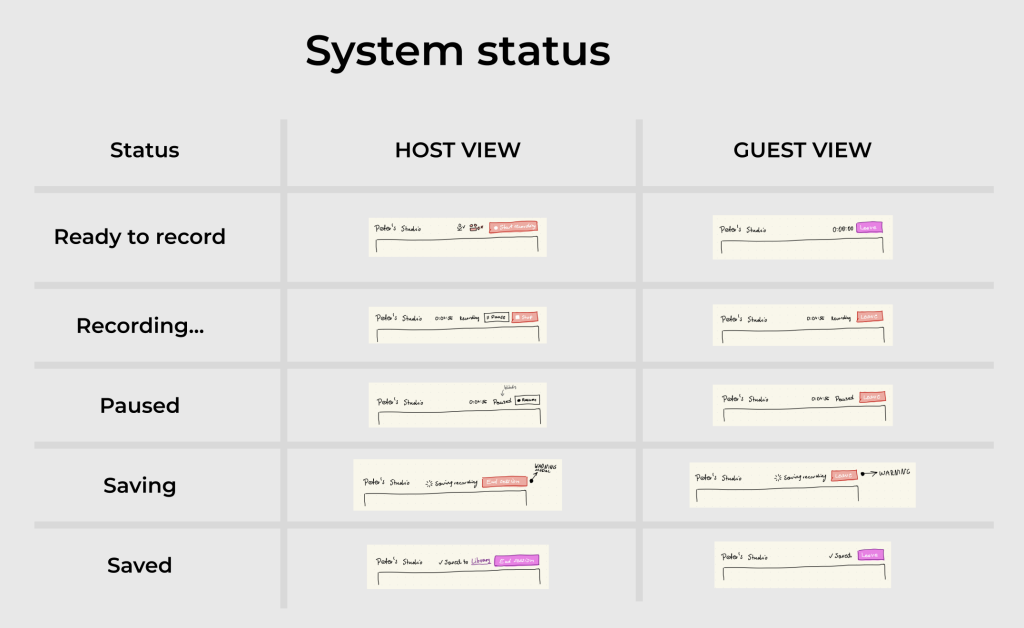
As mentioned, podcast hosts are often exhausted and creating the podcast as an ‘evening job.’ I knew clutter had to be eradicated so that system status was always apparent. These sketches helped me explore every possible state in the application (informed by conversations with devs).
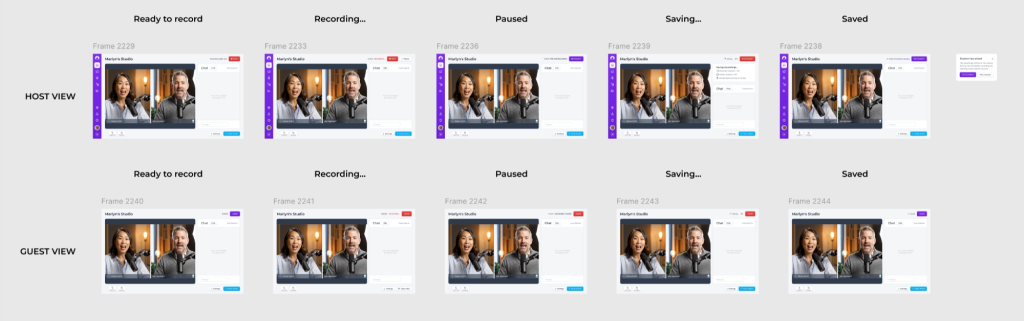
After a few more chats with engineers about the system, I eventually used the components in the design system to create high-fidelity interfaces:
Working with technical limitations of the double-ender system
The next challenge revolved around explaining the double ender system to users and their guests. Under the hood, the system records each call participant’s audio and video separately and then sends it to the cloud for stitching together. This is better than recording the call itself and hoping the internet behaves perfectly. One technical tradeoff of this method is that each user needs to stay in the call long enough for their local recording to be uploaded to the server.
The saving can sometimes take longer than 5 seconds, and in our early betas some users left too early without noticing the ‘saving…’ spinner. I prototyped an intervention: if saving took longer than 5s, a new box would appear asking users to stay in the call, with animation to draw their attention. This helped prevent early leavers.
Code-driven prototyping (when Figma is not quite cutting it!)
I used Figma and GenAI to create this prototype in an hour or two. With each iteration, I could precisely tweak every minutia of the design, for example: different timeouts. Additionally, this work helped me explain this component to developer much easier than with a long spec. I really enjoyed going back to coding to make this design feel just right and the chance to relive my web dev days.
Final Solution
This seamless approach caught Apple’s attention, leading them to feature the interface during WWDC 2025 to showcase the new microphone selection control in new iPadOS:
Users can easily start, pause and end the recording. What’s more, I made sure to go beyond the happy path. As you can see below, a user will be presented with a helpful error message that explains what will happen if they try to leave before the saving is finished:
Our research indicated that guests often forget to mute themselves, therefore we gave the host the ability to discreetly mute the guests to avoid crosstalk and background noise which is difficult to remove during production. Muting is discrete so that guests aren’t made to feel bad for forgetting to mute themselves. Only the host of the call can see who is discretely muted. Additionally, participants who are muted have their video tinted and audio lowered — this way it’s almost impossible for a host to forget.
The quantitative data in our analytics revealed that most of our user base uses our app on very small screens. Therefore any space saving measures were prioritised. For example, we allowed the user to close the chat, and triggered a ‘toast’ component every time someone messaged so that the host would never miss a message from a guest if they ever needed assistance:
And there’s plenty more to explore. Please reach out if you would like a deeper dive into the platform!
User testimonials
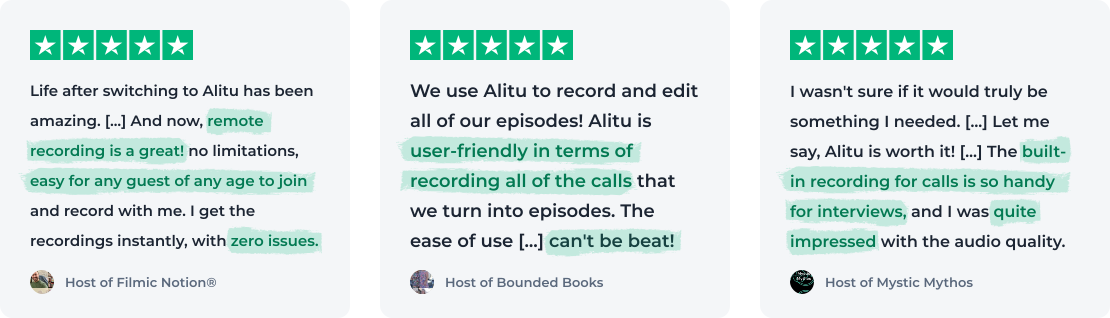
The impact can be shown further by looking at the reviews people were leaving leaving for Alitu. Ease of use and speed was frequently cited and the podcasters below preferred it to solutions like Zoom and others: